
Seedance 3 For Editors Who Locked The Chorus Look

Chorus cuts already agree on a jacket, a face, and a light. When a seedance 3 pickup is asked to cover an angle the day never filmed, it earns a place only if that jacket still matches the chorus the edit already plays twice. A new collar, or a jaw that narrows on the turn, makes the repeat look like a different afternoon, and the assembly cannot hide a mismatch that lands on the same lyric.
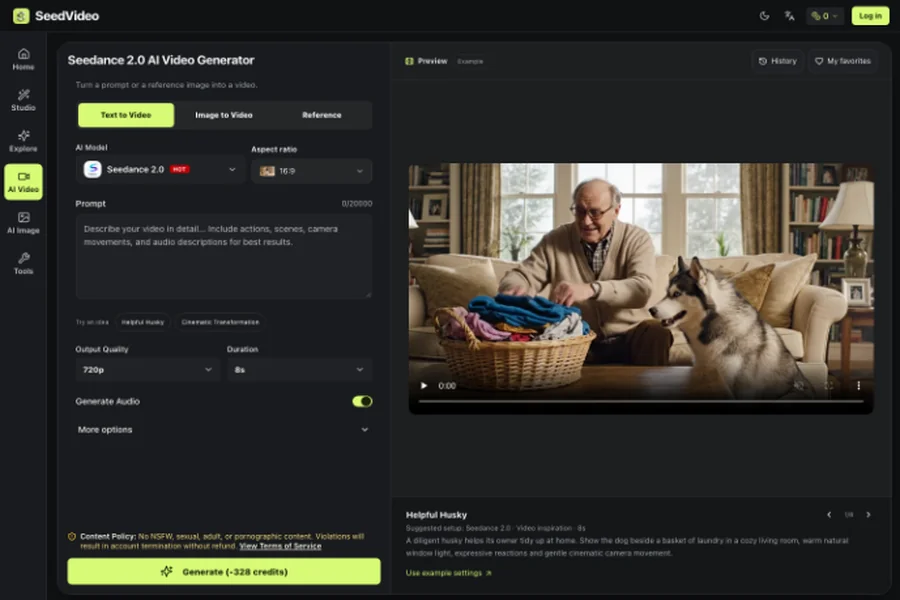
Music editors meet this after picture lock is almost done. The wide chorus is graded, the vocal is the master, and one closer angle is missing because the artist left. SeedVideo is an independent studio, and the model family on the page belongs to ByteDance. The workbench can start from a prompt or a reference image. An image can hold the person, a video can hold the camera, and an audio file can hold the rhythm. The check is narrow. Clothing, face, and the light in the locked chorus stay put while one new angle moves. A smoother push does not outvote a jacket that changed color.
Why The Second Chorus Exposes A New Jacket
A chorus is not a single shot you can apologize for. It comes back, often with the same lyric and a cut the audience has already learned. The first time through, a slightly odd sleeve can pass as style. The second time through, the eye compares it with the shot it remembers. That comparison is the whole problem. If the generated angle introduces a zipper the wardrobe never had, the repeat reads as a continuity error, not as coverage.
Editors already have a way to see this without a new theory. Park the locked chorus on the timeline, drop the new angle on the beat where the closer shot should live, and play across the boundary twice. Pause on the shoulder. If the cloth, the collar, and the side of the face do not belong to the same person in the same practical light, the file fails the intercut even when the camera move itself is pretty. The second chorus is what you are grading, and a prettier push does not repair a jacket the repeat can compare.
Match The Jacket Before You Match The Move
Pick one frame from the chorus that is already in the cut, and treat that frame as the costume. The useful motion is small: a step in, a shoulder turn, a push that finds the hands on the line the vocal already sings. Ask for that motion only. A second request, such as a new gel on the backlight, gives you no way to say which instruction changed the cloth. The published description of consistency is about faces, clothing, text, and style holding across the clip. Clothing is the word that matters on a music cut, because the jacket is what the second chorus will be judged against.
Keep The Face Inside The Same Light
The face fails more quietly than the jacket. A turn that slims the jaw, or a key light that jumps from window-warm to a cooler spot, will not always scream on a single play. It screams when the chorus returns and the close-up no longer matches the wide. Watch the eye line and the shadow under the cheek, not the elegance of the move. If the shadow switches sides, reject the take. The master vocal can stay. The picture cannot pretend it was shot in the same room.
A Pickup Day Burns The Same Eight Bars
The old fix is honest, and that is why it stays the measure. You call the artist back, you find the jacket, you rebuild the practical, and you shoot eight bars that the edit already knows by heart. The cost shows up as a half day of crew, a wardrobe check that fails if the jacket is at the cleaners, and a grade that has to be pulled back toward the locked chorus so the new angle does not sit hotter than the wide. If the collar still looks different, you have spent the call and you are back on the same problem. A generated angle has to beat that pickup, not a fantasy of free coverage. If the new file changes the cloth, the half day was not saved. You added a review, and the chorus already on the timeline is still the picture you can defend.
Give The Still The Move And The Beat Jobs
The page splits the inputs in a way a music desk can use without turning the chorus into a new production. Text alone, on the same workbench, builds a clip from a description. That path fits a concept nobody has shot. It is the wrong start for a performer the cut already shows. A sentence can name the jacket and still return a different jacket. Start from the frame.
Three files, three jobs, and no file is allowed a second job:
- The chorus frame holds the person, the jacket, and the light. It is not a style reference for a different outfit.
- A short, dull camera move holds the push or the step. If that clip shows another costume, pull it. The move is the only thing you are borrowing.
- The master, or a bar of it, holds the beat. The picture should land on the chorus downbeat the vocal already has. A generated voice, or a lyric the model writes, fights the master and gets muted.
Say that split in ordinary language. The prompt box allows a very long entry, up to 20,000 characters. That ceiling is not a reason to write one. A short brief is the one you can check against the frame. Duration is a control on the page, and the published 4-to-15-second list belongs to Seedance 2.0, with a note that other versions differ. Read the duration control for the model you actually selected. Do not copy a menu from a different version and hope the chorus length comes out right.
Name One Job For Each Reference File
When more than one file is attached, the prompt can mark a reference with @ and say what it is for. Use that mark so the frame is not asked to invent the camera, and the camera clip is not asked to invent the jacket. A seedance 3 note for this desk should read like a camera report. Start from the chorus frame. Borrow the push from the move. Lock the picture to the beat of the master. Do not change the jacket, the face, or the practical. If two files disagree, the chorus frame wins, and the other file comes out of the request.
Built-in audio is a separate choice: context-aware effects, or a sync to audio you upload, including a beat. When the master already exists, upload the bar and ask the picture to hit that downbeat. A second melody under a finished chorus is a mix you did not book, so leave the generated score out and keep the vocal that is already in the cut.
Reject A Take That Changes The Chorus Jacket
Play the boundary with the sound up, because the lyric tells you where the eye should land. Then play it once with the picture only, so a nice hit does not talk you into a wrong sleeve. Pause where the shoulder enters. If the cloth drifts, if a seam that was vertical in the wide goes diagonal, or if the face is a cousin of the artist rather than the artist, the take is wrong. Reject it. A clean download is not the same thing as a cut that matches.

The studio describes a Seedance 3.0 file from SeedVideo as watermark-free. That answers delivery, not the chorus. A clean file and a wrong jacket can share one export, so play the repeat before you send it to the artist.
Stop after the second failed take. A third pass that only swaps adjectives spends the hour on the prompt while the missing angle is still missing. Go back to the locked chorus. If a real pickup is still cheaper than another wrong jacket, book the pickup. The tool did not fail because it is slow. It failed because the picture would teach the audience a costume the wardrobe never approved.
Keep The Original Chorus On The Timeline
Leave the locked chorus where it is, and treat the new file as an angle you can drop in only after the jacket, the face, and the light survive the repeat. SeedVideo fits an editor who already has that chorus and needs one move tied to a beat the master already sings. It is a poor fit when the look itself is still being designed, or when the missing piece is a whole new section rather than one angle.
If the repeat holds, cut the angle in and move on to the vocal. If it does not, the honest picture is the chorus you already graded. The artist would rather see the wide again than a closer shot of a jacket they did not wear.